For quite a few days, production was getting hit by random CPU spikes throughout the day. Out of nowhere, the CPU would peg at 100% across all cores, latency would shoot through the roof, and there was never an obvious surge in user traffic to explain it.
When production is melting without a corresponding spike in traffic, you don’t guess—you profile.
The Flame Graph Doesn’t Lie
I fired up async-profiler on the hot instance, grabbed a JFR dump, and loaded the flame graph into IntelliJ:
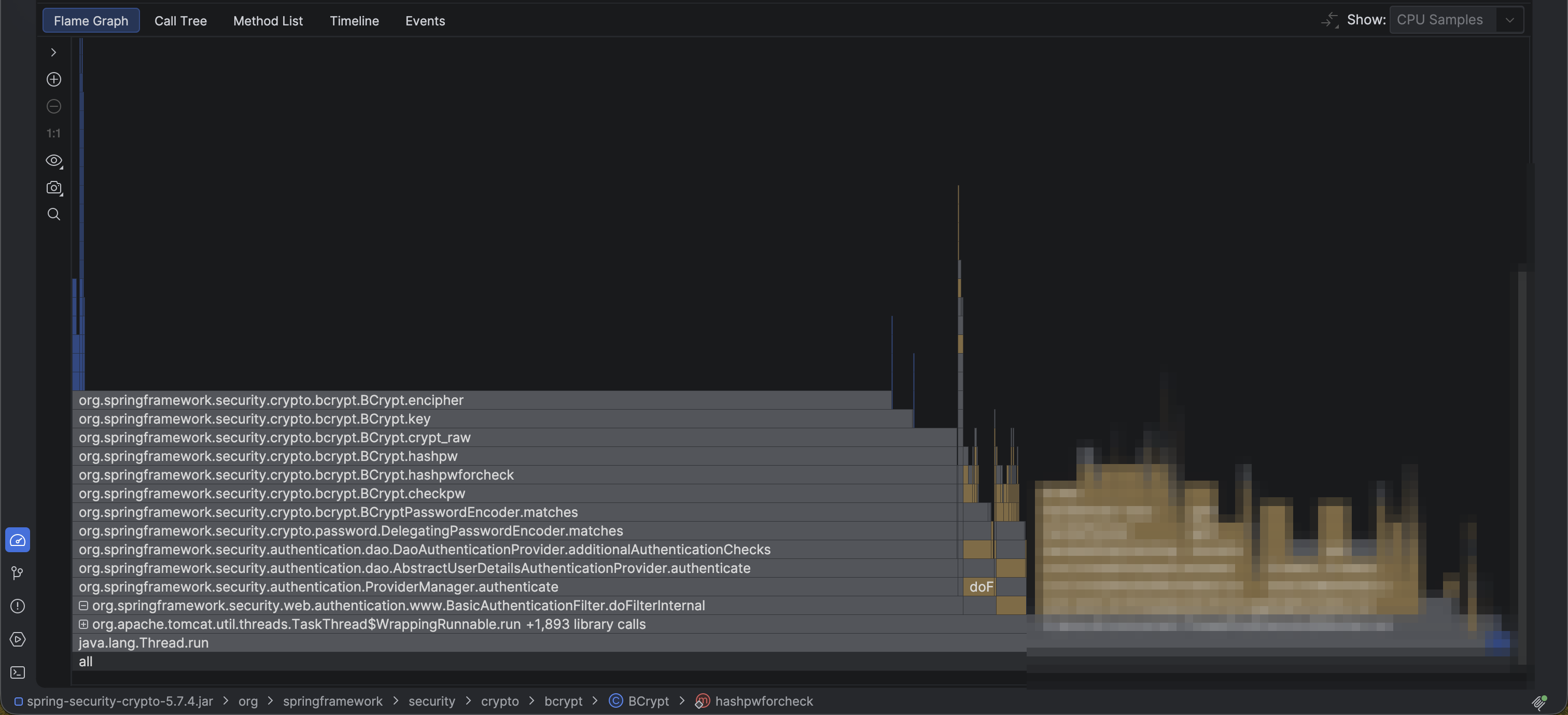
I expected to see a runaway regex, a tight loop over a collection, or maybe some serialization bottleneck. Instead, a massive, monolithic plateau dominated over 70% of the entire CPU sample profile:
org.apache.tomcat.util.threads.TaskThread$WrappingRunnable.run
└── org.springframework.security.web.authentication.www.BasicAuthenticationFilter.doFilterInternal
    └── org.springframework.security.authentication.ProviderManager.authenticate
        └── org.springframework.security.authentication.dao.AbstractUserDetailsAuthenticationProvider.authenticate
            └── org.springframework.security.authentication.dao.DaoAuthenticationProvider.additionalAuthenticationChecks
                └── org.springframework.security.crypto.password.DelegatingPasswordEncoder.matches
                    └── org.springframework.security.crypto.bcrypt.BCryptPasswordEncoder.matches
                        └── org.springframework.security.crypto.bcrypt.BCrypt.checkpw
                            └── org.springframework.security.crypto.bcrypt.BCrypt.hashpwforcheck
                                └── org.springframework.security.crypto.bcrypt.BCrypt.hashpw
                                    └── org.springframework.security.crypto.bcrypt.BCrypt.crypt_raw
                                        └── org.springframework.security.crypto.bcrypt.BCrypt.encipher
Spring Security’s DelegatingPasswordEncoder was delegating down to BCryptPasswordEncoder, and BCrypt was relentlessly burning CPU in BCrypt.encipher. Actual business logic was shoved all the way to the far right, barely getting a slice of processor time.
Each individual password verification was clocking ~100ms of pure compute.
Designed to Be Slow
Every software engineer learns the textbook definition of secure password hashing: algorithms like BCrypt, PBKDF2, and Argon2 are deliberately designed to be computationally expensive and slow.
They exist to defend against brute-force attempts, dictionary attacks, and timing side-channels. The work factor (cost parameter) is specifically calibrated so that checking a password isn’t instantaneous—100ms is standard recommendation territory. A fast password hasher is a broken password hasher.
I’ve always known this in theory. But theory is cute until you see it in production. When an algorithm demands 100ms of sustained CPU time per invocation, doing 10 checks a second consumes a full core. Do 50 or 100 checks concurrently across threads, and your server completely runs out of gas.
So why on earth was my backend running password hashing hundreds of times a second?
The Cheap Hack Behind the Spike
It wasn’t users logging in.
It was an internal service.
A while back, another service needed to query my endpoints. As a quick shortcut, it was configured to authenticate via standard HTTP Basic Authentication. It simply packed the username and password into a Base64 string and tossed it in the Authorization header with every single HTTP request.
GET /api/internal/status HTTP/1.1
Authorization: Basic dXNlcm5hbWU6cGFzc3dvcmQ=
Because HTTP Basic Auth is stateless, Spring Security’s filter chain diligently intercepted every incoming call, extracted the credentials, and passed them to DelegatingPasswordEncoder.matches().
Every. Single. Request.
A harmless internal worker making regular background requests had turned an intentionally slow, secure password hasher into an accidental, self-inflicted Denial of Service against my own server.
Now it all made sense. It’s also why poorly architected login portals—like those infamous government portals—crawl under any real load. When authentication does heavy cryptographic lifting on every attempt, it doesn’t take much to bring the system to its knees.
The Band-Aid: Caffeine Cache
I needed to relieve CPU pressure immediately without waiting to refactor authentication contracts across services.
As a quick hotfix, I put an in-memory Caffeine cache directly in front of the credential check:
val authCache: Cache<String, Boolean> = Caffeine.newBuilder()
    .expireAfterWrite(5, TimeUnit.MINUTES)
    .maximumSize(10_000)
    .build()

fun authenticate(rawPassword: String, encodedHash: String): Boolean {
    val cacheKey = hash(rawPassword + encodedHash)
    return authCache.get(cacheKey) {
        passwordEncoder.matches(rawPassword, encodedHash)
    }
}
Caching password verifications is a classic band-aid: I have to be careful with cache invalidation when passwords change, and I don’t want to cache failed attempts indefinitely. But for rapid, repeating requests with identical credentials from an internal service, it dropped CPU utilization from 100% back down to baseline instantly.
The Real Fix
A cache is a temporary shield, not the architectural answer. The real fixes I’m making:
- Token-Based Authentication: Moving internal callers to short-lived bearer tokens (or API keys checked via constant-time equality) rather than sending raw credentials on every request. Password hashing should only run once when issuing a token or session.
- Aggressive Rate Limiting: Placing strict rate limits on any endpoint that triggers password hashing. Login endpoints should never be allowed to bombard the server unchecked.
- Dedicated Internal Endpoints: Decoupling internal machine-to-machine traffic from user authentication pipelines entirely.
It’s easy to dismiss a cheap hack when you first write it—“it’s just an internal caller, it’s fine.” But when high-security password hashing meets high-frequency HTTP requests, your CPU will remind you that 100ms adds up fast.